
Note: This manual may cover
several products or versions of one product.
Other products or versions covered by this manual may still be active.
Model 214A
Reference Manual
| Table of Contents |
|
|
|
1.0 Description 2.0 Specifications 3.0 Installation 4.0 Operation 5.0 Troubleshooting 6.0 Connector Pin Assignment 7.0 Power 8.0 Help Warranty - Spanish Manual - |
|
|
1.0 Description
The Model 214 Fastwire Short Haul Modem allows for full duplex transmission up
to 38.4 KBPS over a single twisted pair. Transmission over the twisted pair is
made possible through on board adaptive echo cancellation that allows the units
to differentiate between incoming and outgoing data.
2.0 Specifications
2.1 Interface : RS-232-CCITT V.24 : Pins 2 & 3 transmit and receive data,
switch selectable. Pin 1, Frame Ground. Pin 7, Signal Ground. Pins 4 & 5 are
connected together as well as pins 6, 8, and 20.
2.2 Transmission Format : Asynchronous, full duplex
2.3 Data Rate : .3 to 38.4 KBPS
2.4 Transmission Controls : CTS (Pin 5) turns ON immediately after the
terminal raises RTS (Pin 4.) DSR (Pin 6) and DCD (Pin 8) turn ON immediately
after the terminal raises DTR (Pin 20.)
2.5 Transmission Mode : Full Duplex, 2 wire
2.6 Transmission Line : 2 wire, unconditioned line (1 twisted pair.)
2.7 Transmit Level : 1.5mW across 120 Ohms.
2.8 Transmission Distance :
| Wire Gauge | Distance |
|---|---|
| 26GA | 1.5 miles |
| 22GA | 3 miles |
2.9 Connector
RS-232 : 214AM = DB-25M; 214AF = DB-25F
Line : Screw terminals and RJ-11 jack
Power : 3.5 mm
2.10 Power : The Model 214A is powered via a wall mounted DC power pack.
2.11 Indicators : Ready LED - indicates when there is a valid connection
between the two units.
2.12 Switches DTE/DCE - allows reversing of Pins 2 and 3.
Master/Slave - One unit is set for Master while the other unit is configured as
a Slave.
2.13 Size : 2" W x 3.5" L x .875"H
2.14 Environmental Ranges : 0° to 50° C, 0 to 95% RH non-condensing.
3.0 Installation
3.1 Digital Interface : The Model 214 can be ordered with either a male
or female DB-25 connector. A Model 214AM comes equipped with a DB-25 male
connector while the 214AF is equipped with a DB-25 female connector.
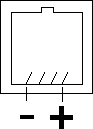
3.2 Analog Interface : The analog interface features 2 screw terminals
marked + & - and a RJ-11 modular phone jack. When connecting the 2 units
together the + on one unit goes to the + on the other unit and the - to the -.
The cable used should be high quality twisted pair and color coded to facilitate
installation and repair. The phone plug configurations are shown below.
4.0 Operation The Model 214 comes equipped with 2
switches, DTE/DCE and Master/Slave, and a LED marked "READY."
4.1 DTE/DCE : The DTE/DCE allows the user to reverse Pins 2 & 3 on the
RS-232 side. When connecting to a device that uses Pin 2, Transmit Data, as an
output, such as a terminal or PC, then set the Model 214 for DCE. When
connecting to a device that uses Pin 3, Receive Data, as an output, a dial up
modem for example, then set the Model 214 for DTE.
4.2 Master/Slave : When two Model 214's are operating on a link one unit
must be switched to Master and the other switched to Slave.
4.3 Ready LED : Once the transmission line connections are made, as
described in Section 3.2, the Ready LED will turn ON. This LED informs the user
that the link between the 214's is established and both modems are operational.
5.0 Troubleshooting
Proper operation of both units can be determined through the Ready LED. Once the
LED is illuminated, proper communication between the two units has been
established and the units are ready for operation. If the LED does not come on
one of the following could be at fault.
1. No power - transformer defective or not plugged in.
2. Connections at screw terminals or RJ-11 are not correct.
3. Break in connecting cable.
4. Master/Slave switch not set properly (Sec 4.2).
5. Defective unit.
| Pin | EIA | CCITT | Name |
|---|---|---|---|
| 1 | AA | 101 | ** Frame Ground |
| 2 | BA | 103 | * Transmit Data |
| 3 | BB | 104 | * Receive Data |
| 4 | CA | 105 | *** Request to Send |
| 5 | CB | 106 | *** Clear to Send |
| 6 | CC | 107 | **** Data Set Ready |
| 7 | AB | 102 | ** Signal Ground |
| 8 | CF | 109 | **** Data Carrier Detect |
| 20 | CD | 108.2 | **** Data Terminal Ready |
* These signals can be reversed using the DTE/DCE switch.
**, ***, **** Connected together.
7.0 Power
The Model 214's operating power is derived from a small wall mounted transformer
DC power pack supplying 9 VDC at 200 mA.
8.0 Help
Assistance can be obtained by visiting our
Technical Support
Center.
Warranty
Telebyte warrants the equipment to be free from defects in
material and workmanship, under normal and proper use and in its unmodified
condition, for 12 months, starting on the date it is delivered for use.
TELEBYTE's sole obligation under this warranty shall be to furnish parts and
labor for the repair or replacement of products found by TELEBYTE to be
defective in material or workmanship during the warranty period. Warranty
repairs will be performed at the point of manufacture. Equipment approved for
return for warranty service shall be returned F.O.B. TELEBYTE factory and will
be redelivered by TELEBYTE freight prepaid, except for non- continental U.S.A.
locations. These deliveries will be sent COD freight and import/export charges.
THE ABOVE WARRANTY IS IN LIEU OF ALL OTHER WARRANTIES, EXPRESSED OR
IMPLIED, STATUTORY OR OTHERWISE, INCLUDING ANY IMPLIED WARRANTY OF
MERCHANTABILITY OR FITNESS FOR A PARTICULAR PURPOSE. TELEBYTE SHALL NOT BE
LIABLE FOR ANY DAMAGES SUSTAINED BY RESELLER OR ANY OTHER PARTY ARISING FROM OR
RELATING TO ANY EQUIPMENT FAILURE, INCLUDING, BUT NOT LIMITED TO CONSEQUENTIAL
DAMAGES NOR SHALL TELEBYTE HAVE ANY LIABILITY FOR DELAYS IN REPLACEMENT OR
REPAIR OF EQUIPMENT.
Out of warranty equipment may be returned to the Greenlawn, NY customer service
facility prepaid as described above. Return shipping charges will be billed to
the customer. The repaired unit will have a 90 day warranty. In those cases
where "NO TROUBLE" is found, a reduced charge will be billed to cover handling,
testing and packaging.
Whether in or out of warranty a Return Material Authorization number (RMA) is
necessary. Assistance can be obtained by visiting our
Technical Support
Center.
Document No. 0315-0090/Rev. C