|
|
|
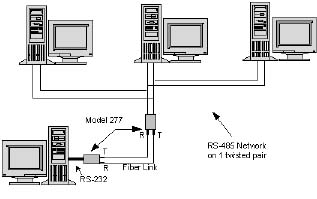
1.0 Equipment Description1.1 IntroductionThe Model 277 Multi-mode Fiber Optic Modem is an asynchronous product. The optical interface can operate in either point-to-point or ring configurations and employs two "ST-" type connections. The unit operates on fiber optic cables with core diameters from 50 to 100 microns. The electrical interface
operates in either point-to-point or multi-drop configurations. When
configured as RS-232 or RS-422 the unit will operate point-to-point.
With the RS-485 interface selected, equipment can be multi-drop
connected onto low-cost twisted-pair wire (see Figure 1). The
versatility of the two interfaces of the Model 277 allows for an
extremely flexible system design. |
|
|
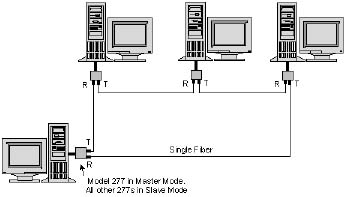
1.2 Optical InterfaceIn an optical point-to-point configuration, two Model 277s are connected back to back to form a simple, high-speed, full-duplex optical link. In optical ring operation, two or more 277s are cascaded in a ring. A ring consists of one master modem and two or more slaves (see Figure 2). The slaves pass received optical data and transmit data from their electrical interface to their optical transmitters. The master does not pass
received optical data. Master/slave modes are switch selectable. Master
mode is selected for both modems in an optical point-to-point
configuration. |
|
|
|
Note: In RS-485 two-wire mode (when
configuring the Model 277 in an optical ring) the master cannot be
enabled by the "TD" signal.
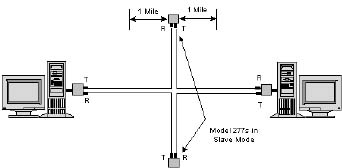
The Model 277 optical
interface can form a ring of up to ten units. This allows for a maximum
optical system loss budget of 120 dB. In order to extend the optical
distance between any two Model 277s, the units are inserted in the
optical path to act as line extenders. Slave mode should be selected for
optical line extenders (see Figure 3). |
|
|
1.3 Electrical InterfaceThe Model 277's electrical interface is switch selectable to RS-232 or RS-422/RS-485 voltage levels. When the RS-232 interface is selected, communications to the electrical interface are full-duplex point-to-point. With this interface, data can be transmitted onto the optical fiber for a point-to-point optical link or for an optical ring. Switch selection enables data to flow from the electrical interface to the optical transmitter or can be controlled by a high on RTS. On the electrical interface, a high on the Data In pin causes light to be emitted. Full-duplex (four-wire) or half-duplex (four- or two-wire) mode may be selected when the RS-422/RS-485 interface is selected. The RS-422/RS-485 interface of the Model 277 can operate in a multi-dropped or point-to-point environment. If RS-422 mode is selected the electrical interface is only point to point. If the customer's equipment has an RS-485 interface, it can be multi-dropped directly onto the Model 277's interface by selecting the four-wire or two-wire RS-485 mode. If the customer's equipment has an RS-232 interface, the equipment can be converted to a multi-drop, RS-485 interface by a Telebyte Model 285. Up to 31 units of the Model 285 can be multi-dropped onto the same electrical interface of the Model 277. 1.4 Flow ControlOperation in the RS-485 multi-drop or the ring environment requires that all devices connected to the line have some level of intelligence in order to establish an orderly flow of data. When RS-485 (half duplex) mode is selected, the Model 277 controls the Receive Data line on the electrical interface. When data is not received (no light on fiber) by the optical receiver for ten microseconds, the output of the Receive Data electrical transmitter is tri-stated. In RS-485 mode this enables many transceivers to communicate on the same twisted pair. When the RS-485 two-wire mode is selected, half-duplex data is transmitted and received on the same twisted pair. Note: In RS-485 two-wire mode (when configuring the Model 277 in an optical ring) the master cannot be enabled by the "TD" signal.
|
2.0 Specifications2.1 Optical InterfaceOptical connectors: ST™
(trademark AT & T) 2.2 Electrical InterfaceElectrical connector: DB-25, male Interface type: Switch selectable RS-232 (pinout conforms
to RS-232) Bit Rate: RS-232: 0 to 115.2 KBPS Interface Mode: Switch selectable. Unit can be configured to appear as a DCE or a DTE. 2.3 General SpecificationsIndicators: Four LEDs LTD Local Transmit Data
|
3.0 Equipment Operation3.1 Switch Options The Model 277 is a
versatile unit. It has many switch-selectable options that can be used
to tailor it to different communications requirements. Two of the
switches are located on the front panels. Another ten can be accessed
from the bottom of the unit. The following tables list the switch
selections and their functions. |
||||||||||||||||||||||||||||||||||||||||||||||||
|
||||||||||||||||||||||||||||||||||||||||||||||||
|
||||||||||||||||||||||||||||||||||||||||||||||||
|
||||||||||||||||||||||||||||||||||||||||||||||||
|
The connections to the electrical interface are through the DB-25 connector located on the rear of the Model 277. The signals on these pins are shown in the tables that follow. These signals (as well as their functions and directions) vary with the switch settings. Proper connection requires, at a minimum, the use of TD, RD and GND. The tables that follow show the signal names and their sources for the various settings of the DCE/DTE switch and the 232/4XX switch. The Model 277 is powered from an external transformer supplied with the unit. The power transformer is plugged into 115 VAC and converts the 115 VAC to an unregulated DC voltage to be used by the unit. The connection to the transformer on the Model 277 is located on the rear of the unit. A 220 VAC, 50 Hz transformer is available as an ordering option. Electrical Interface
Pinouts |
||||||||||||||||||||||||||||||||||||||||||||||||
|
||||||||||||||||||||||||||||||||||||||||||||||||
|
Note: When connecting to the Telebyte Model 285 the polarities of the TD and RD pins must be reversed.
|
||||||||||||||||||||||||||||||||||||||||||||||||||||||||||||||||||||||||||||||||||||||||||||||||||||||||||||||||||||||||||||||||